
Access to the safe tool of the repository can be provided for single users or user-groups by the system administrator.
On this page:
Granting access to the safe:
-
Log in as the system administrator.
-
Open the Workspace view.
-
Navigate to: Edu_Sharing_System › Edu_Sharing_Sys_ToolPermissions.
-
Locate the object "TOOLPERMISSION_CONFIDENTAL".
-
Invite the corresponding user or group to the object and give them "viewer" rights.
-
Make sure the "...and may publish" option in the rights drop down menu is switched off.
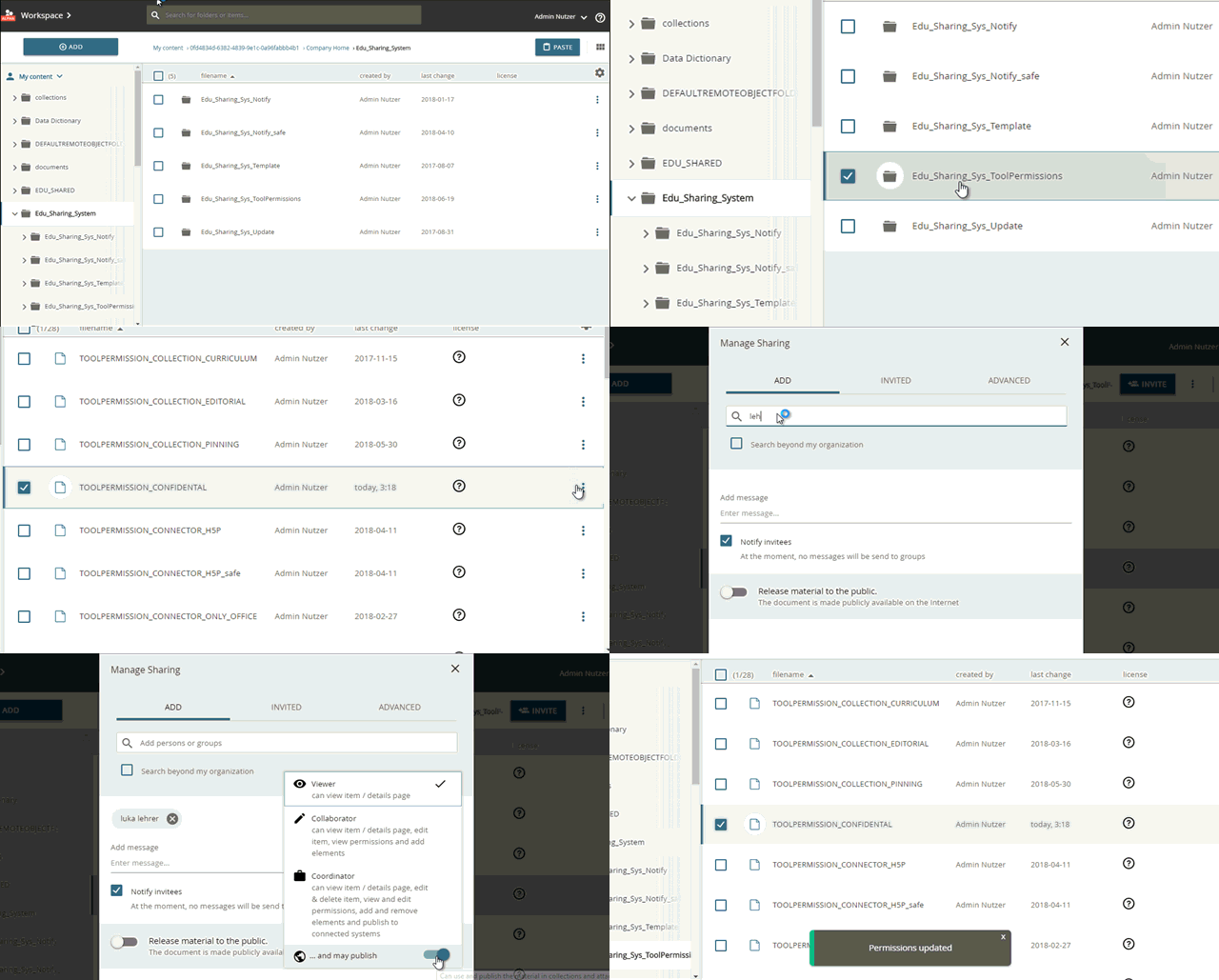
assigning access to the safe tool
Revoking access to the safe:
-
Log in as the system administrator.
-
Open the Workspace view.
-
Navigate to: Edu_Sharing_System › Edu_Sharing_Sys_ToolPermissions.
-
Locate the object "TOOLPERMISSION_CONFIDENTAL".
-
Un-Invite the corresponding user or group from the object (Open invite dialogue, select the "INVIDED" tab and press the "x" button for the desired entry.).